

Marillion Chinese Journal Reader
Study Chinese (simplified) Watchtower study articles word by word, with pinyin, English and the Bible verses alongside. Free, for Windows.
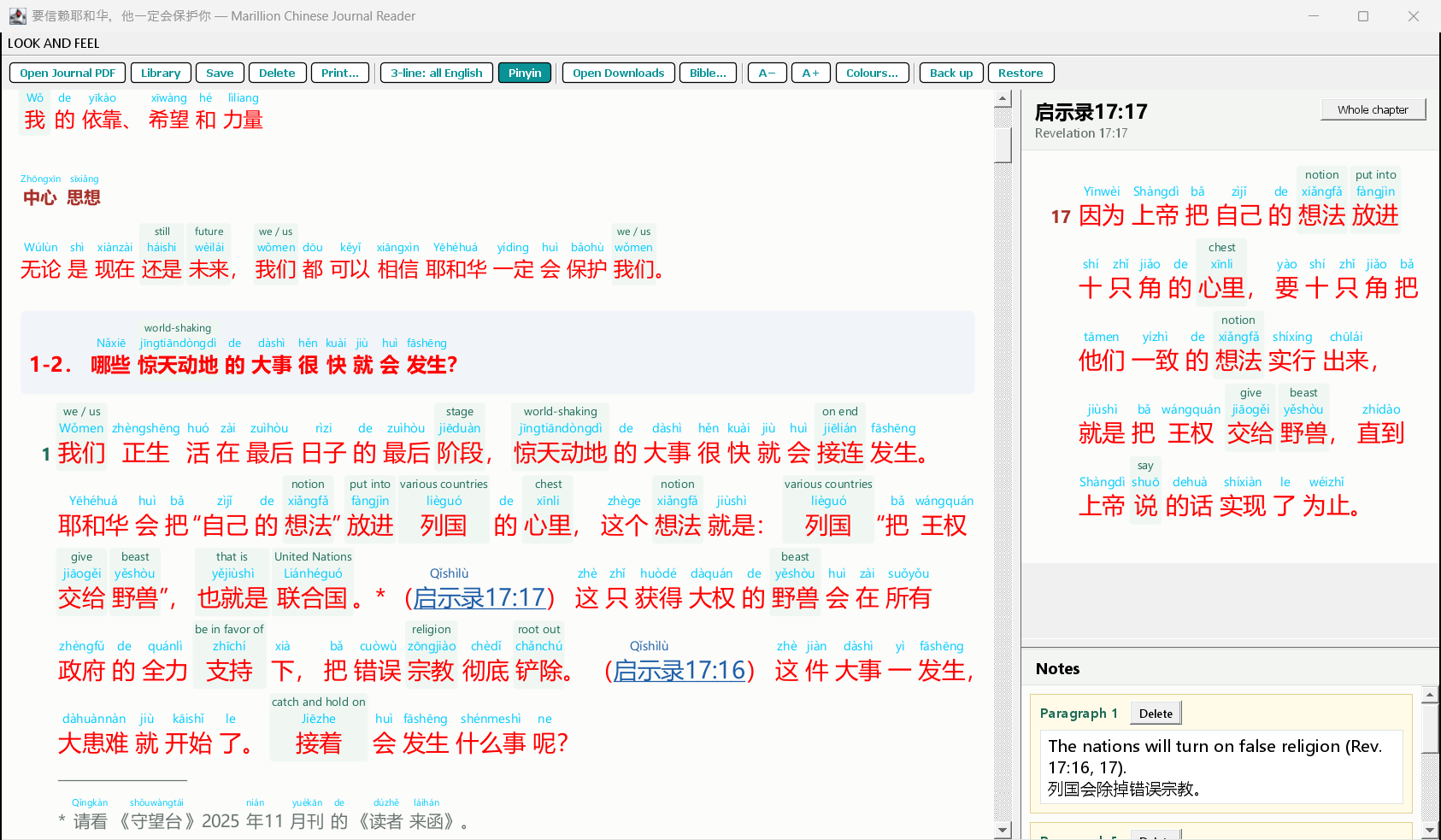
Click a word to see its English
Try it: click a word. In the program the English stays above that word everywhere it occurs, and is saved with the article. Show English above every word
What it does
Characters and pinyin
Opens the Chinese journal PDF, either the plain edition or the pinyin edition, and shows every word with its pinyin.
English on the words you choose
Click a word for its English from a built-in dictionary. Turn on "3-line" to see English above every word. You can change any English.
Scriptures alongside
Click a scripture reference and the verses appear on the right, with pinyin and clickable English too.
The English edition
Right-click a sentence to see the same sentence in the English Watchtower of that month, side by side.
Paragraph notes
Right-click a paragraph number to write a note in English, Chinese or pinyin. Notes are saved with the article.
Library, print and back up
All your studied articles in one list. Print an article with your notes, or save it as a PDF. Back up everything into one file.
It works without the internet: the dictionary is built in, and nothing about you or your files is sent anywhere. Once a day it looks at this website to see whether a newer version is out; that's all it fetches.
How to install
- Click Download for Windows and open the file when it has downloaded.
- If Windows shows "Windows protected your PC", click More info, then Run anyway. This appears because the program is new and not yet known to Windows.
- Follow the Setup. It installs just for you; no administrator password is needed. You can choose to put an icon on your desktop.
- Start Marillion Chinese Journal Reader from the Start menu (under Marillion) or from your desktop.
- Then add the Bibles and journals: see Getting started below.
Already have an older version? Just run the new Setup: it replaces the old program and keeps all your articles, notes and Bibles. To remove the program, use Windows Settings → Apps.
Getting started
The program does not include any journals or Bibles. Download them yourself as PDF files from jw.org into your Downloads folder, always the Chinese and the English one:
- The Bibles, once:
nwt_CHS.pdfandnwt_E.pdf. Get the revised Bible (2013 Revision), not the study edition: the Chinese study edition can't be downloaded as a PDF. - The Watchtower, study edition, each month: e.g.
w_CHS_202608.pdf(or the pinyin edition) and the English one of the same month,w_E_202608.pdf.
Then, in the program, click Open Downloads and select each file to bring it in.
What's new
Version 1.0.3
- The program now tells you when a new version is ready, and can download and install it for you. You can also check yourself with HELP → Check for updates.
- HELP → About shows which version you have.
- If you have an earlier version, download this one from this page once; after that, updates come to you.
Version 1.0.2
- Opening an article you have already studied, from its journal, now always brings back your saved study with its words and notes, instead of starting a new empty copy.
Version 1.0.1
- The dividers between the article, the scriptures and the notes can be moved, and stay where you leave them.
- The English edition is also shown for the date, theme scripture, song and focus at the start of each article.
Version 1.0.0
- First release.
Credits and licences
Marillion Chinese Journal Reader is free and provided as it is, without any warranty. It is an independent program and is not made by or connected with jw.org or the publishers of The Watchtower.
- Chinese–English dictionary: CC-CEDICT, licensed under Creative Commons Attribution-ShareAlike 4.0.
- Apache PDFBox and Gson, licensed under the Apache License 2.0.
- Java runtime: Eclipse Temurin (OpenJDK), GPL v2 with the Classpath Exception.