
How to use Chinese Journal Reader
Six short steps, from installing the program to studying your first article.
Before you start
The program doesn't come with any journals or Bibles. You download them yourself, free, as PDF files from jw.org, into your Downloads folder. Then you bring them into the program with its Open Downloads button. Always get both the Chinese and the English one:
| Chinese | English (for comparison) | |
|---|---|---|
| Bible (once) | nwt_CHS.pdf | nwt_E.pdf |
| Watchtower (each month) | w_CHS_202608.pdfor the pinyin edition | w_E_202608.pdfthe same month |
Download the revised Bible, not the study edition. Choose the New World Translation of the Holy Scriptures (2013 Revision) for both languages. The Chinese study edition can only be downloaded as JWPUB, not as PDF, so the program can't use it. The verses are the same in both.
- Install the program: download the Setup and run it.
- Add the Bibles: the Chinese and the English Bible, once.
- Add the journals: each month's Chinese Watchtower with the English one of the same month.
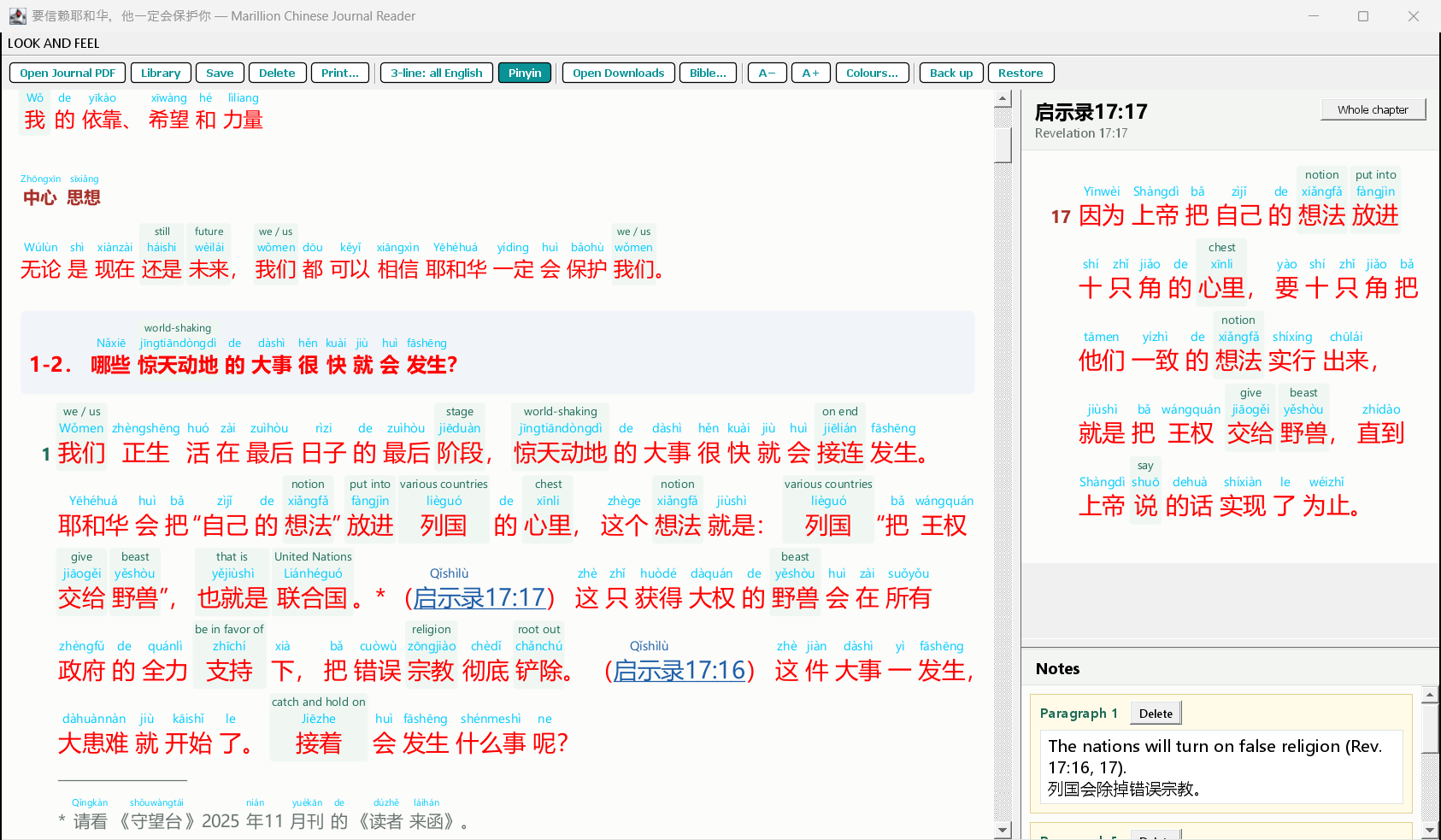
- Study an article: click words for their English, click scriptures to read them.
- English of a sentence: compare a sentence with the English Watchtower.
- Notes, Library and more: paragraph notes, your saved articles, printing and backing up.