
Step 5 of 6
English of a sentence
See any sentence beside the same sentence in the English Watchtower. This is why you download the English journal of the same month.
- Right-click any word in the sentence.
- Choose Show English for this sentence…
- A box shows the Chinese sentence with pinyin and the English of each word, and underneath, the English Watchtower's paragraph with the matching sentence highlighted.
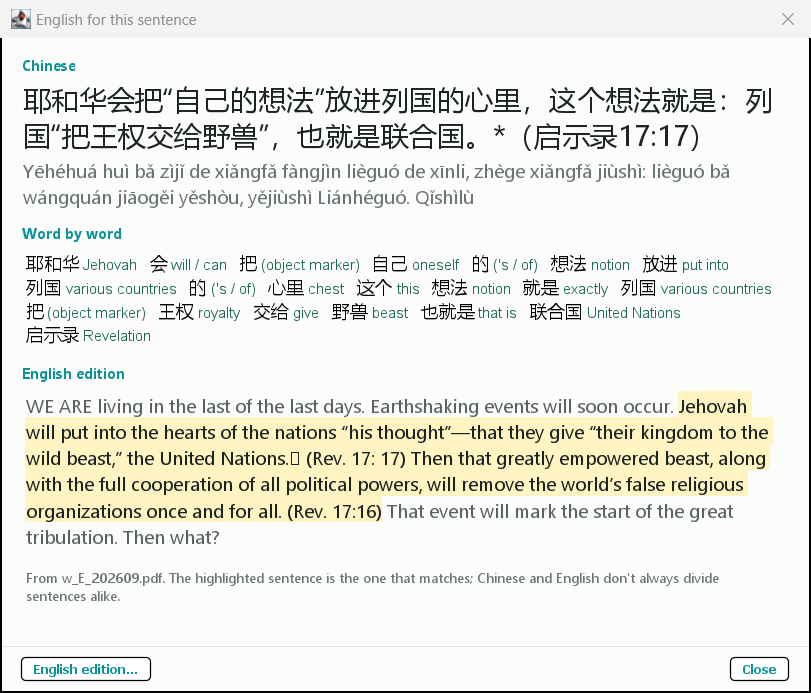
It works for paragraphs, questions, headings and the title, and also for the date, theme scripture, song and focus at the top of the article.
A verse in English
Do the same on a verse in the scripture panel on the right, and the box shows that verse from the English Bible
(nwt_E.pdf).
No English shown? The program needs the English Watchtower of the same month in it,
for example w_E_202608.pdf for w_CHS_202608.pdf. Download it, bring it in with
Open Downloads → Journal (step 3), and open the box again.
If you choose an English journal of a different month, the program tells you which file it needs.